• Twitter
  • Facebook
  • Google+
  • Instagram
  • Youtube

Project

My latest projects


[FIXED] iPhone and iPad in Low Battery and Apple Logo ENDLESS LOOP (bootloop)


Hi there..


My iPhone 4 will not boot into iOS Home menu (look at the video).
When the power cable is connected the iPhone boots up initially and displays the apple logo for ~3.5 seconds, then it goes to a blank screen for another ~2 seconds and the process repeats (indefinitely it seems - at least at this point).
When the power cable is removed the screen instantly goes blank again.
Nothing happens when pressing the power button when the iPhone is not connected.
I can get the iPhone into recovery mode by holding the home button before I plug it in, and then it stays on the recovery screen, not coming on and off like the apple logo was earlier. Again, when I unplug the cable it goes back to a powerless blank screen.
The iPhone is detected on iTunes in recovery mode and I have attempted to restore it, both using my MacBook and windows PC. Each time it results in an error at the point where the iPhone appears to restart. Error 2001 on the macbook and 21 on the windows pc.
Latest iTunes version, restarted computer several times, tried different USB ports, change USB cable.
I was also able to get the iPhone into DFU mode where the screen was blank but it was recognized in iTunes as being in recovery mode. Same situation as before, the device will not restore and I get various error codes across my mac and pc.
I have since opened the device up and confirmed that the battery is in-fact securely attached to the logic board.
It is also worth mentioning that my iPhone is no longer under warranty.
My thoughts at this point is that the battery itself is dead, and won't hold any charge which is why the device shuts off immediately after removing the power cable, does this seem reasonable and should I order a new battery

HOW TO FIX IT? 

Dont panic!
The remedy is quiet simple, follow these steps to get the iPhone or iPad to home screen to power it down so it has sufficient time to charge up and boot normally and get off the endless loop.

  1. Plug into wall socket to get it charging.
  2. Wait until the apple logo appears and wants to boot up.
  3. QUICKLY hold down home button and reset/sleep button at the same time until it reboots.
  4. Release buttons now. should now power down and reboot
  5. Repeat step 3 at least 30 to 40 times which is about 10 minutes in duration everytime you see the logo appear on the screen.
  6. Now Let iPad/iPhone boot up fully, should see home screen with about 2% battery life
  7. QUICKLY hit the rest/ sleep button down for about 2 to 5 seconds.
  8. Swipe the screen to when slider appears to switch off the iPad/iPhone.
  9. This will now power down the iPad/iPhone which now will not reboot by itself so it can now charge without any interruption’s.
  10. Allow battery to charge for a least an hour or two without trying to put it on.
  11. Switch the iPad/iPhone on
  12. You should now have about 10 to 20% battery Life
  13. Power it down again by holding the reset/sleep button down again and swipe the screen to power down, let it charge fully to 100% now which will take few hours
  14. Enjoy your iPad/iPhone again

Lesson learnt. When your battery power is low, dont wait for it drain completely, rather power the pad down manually and let it charge when there is only about 2 to 4% battery life left.

Hope this guide helps people with the same problem as I had. Took me about 2 days of research and searching until I found a solution that worked. Hopefully this will assist anyone going through the same pain, and possibly not have to buy another one which seems to be the case when people take the pad to an iStore with the same issue.

Cheers (source: WildChild7778 from Apple Discussion forum)
[Have been tried and my iPhone can turn ON and Charged up to 70% but after it died again]


If the FIRST tips not work,  lets try the SECOND tips
Charging using your laptop or PC with DFU Mode on iTunes
If you see notification on iTunes, ignore it dont close the window and dont try to restore or update your iDevice, function we connect iDevice to the pc just to charge the battery in the "Black Screen" with DFU Mode
[Have been tried and my iPhone can turn ON and Charged but after 30 minutes died again]
How to make your iDevice enter DFU Mode?
Click Here


If the SECOND tips not work,  lets try the LAST tips
There is no harm to replace old Battery with a new Battery (personal experience)  
[WORK! 100% back to normal again]

Tips dalam Bahasa Indonesia saya (Numb.Child) posting di KASKUS
Post 1 | Post 2


All Subtitle

I Have A Lover (애인 있어요 / Aein Isseoyo)

Episode 45 Subtitle INDONESIA 


  • Release info:
    애인있어요.I.Have.A.Lover.E45.160213.HDTV.H264.540p-watdeheck.net-RWH
  •  By
    RevelationWH
  • Manual Translate by me
    Perfectly synced for all versions of episode 45.
    Enjoy this drama!
    visit my website www.watdeheck.net for more! Thanks for using my sub :) 
    Download 


    ------------------------------ 

    Enemies In-Law (Meet the In Laws 2)
    a.k.a

    Clash Of the Families 2 (2015)

    Poster

    inget file sub film ini bukan saya yang buat, saya cuma bantu share, karena sepengalaman saya sub ini susah banget dicari di google dan di subscene karena nama aliasnya (a.k.a) bikin bingung

    • Release info:
      Dangerous.Meeting.of.In.Laws.2.2015.720p.HDRip; 위험한상견례2.150520.iMrel.720P
    • A commentary by
      t0t0r0
    • Do NOT reupload my subtitles to ANY website w/o my consent. IF YOU WANT TO RESYNCH THE SUBTITLE, DO NOT REMOVE NOR REPLACE THE CREDIT/MARKING. Thx.

    yaudah tanpa babibu langsung aja comot di sini

    HAPPY WATCHING! 


Cara Membuat Akun SSH di Mytunneling.com untuk HTTP Injector [Trik Internet Gratis]

Selamat pagi, siang, sore, malam atau kapanpun teman-teman mengakses tutorial kali ini di WatDeHeck.NET
Di hari yang cerah ini saya akan share tutorial cara bikin akun SSH di mytunneling.com bagi yang belum tau apa itu SSH dan gunanya untuk apa silahkan googling dulu di : KLIK DISINI

Sebelum kita mulai perlu diketahui bahwa Jam pembuatan SSH akun itu ada 2 waktu:
yaitu jam 12.01 (malam) dan jam 12.01 (siang)
jadwal itu harus sobat ingat karena biasanya kalau sudah jauh dari jam tersebut server bisa penuh saat pembuatan akun sobat
seperti ini hasilnya bila server kepenuhan:

solusinya sobat cari server lainnya yang belum penuh seperti gambar di bawah ini:


Okay sob langsung saja simak tutorialnya :

1. Silahkan buka situs mytunneling.com atau bisa KLIK DISINI
kemudian klik menu SSH server dan pilih lagi SSH server (lihat gambar)


2. Setelah terbuka anda akan dipilihkan beberapa server SSH diantaranya USA, Japan, SG , Indonesia. Nah tapi saya sarankan kawan memakai server SG alias Singapura SGDO jangan Public karena SGDO usernya sedikit jadi kemungkinan 'LAG' sedikit. (di contoh ini saya memakai SGDO). Alasannya karena singapura itu lebih dekat dengan negara kita dan kecepatannya bisa di bilang JOSS.. nah setelah teman-teman pilih serverya kemudian klik CREATE SSH ACCOUNT 3 DAYS (biasanya kalo yang 7 days itu udah limited harus nunggu jam 12 malem lebih 1 menit (12.01 AM) daftarnya biar gak keduluan sama orang)


3. Setelah itu akan muncul form baru, isi username dan password sesuai dengan keinginan teman-teman minimal 4 huruf (karakter) kemudian klik create account.


4. Setelah itu kalo tidak ada kendala, akun akan sukses dibuat.
Seperti gambar di bawah ini:


Nah, teman-teman sudah mendapatkan semua yang dibutuhkan seperti:
Username:
Password:
Host SSH:
Dan masa account SSH tersebut

Step yang terakhir tinggal copy paste deh di notepad teman-teman
Dan gunakanlah sesuai keinginan teman-teman, misal untuk aplikasi HTTP Injector
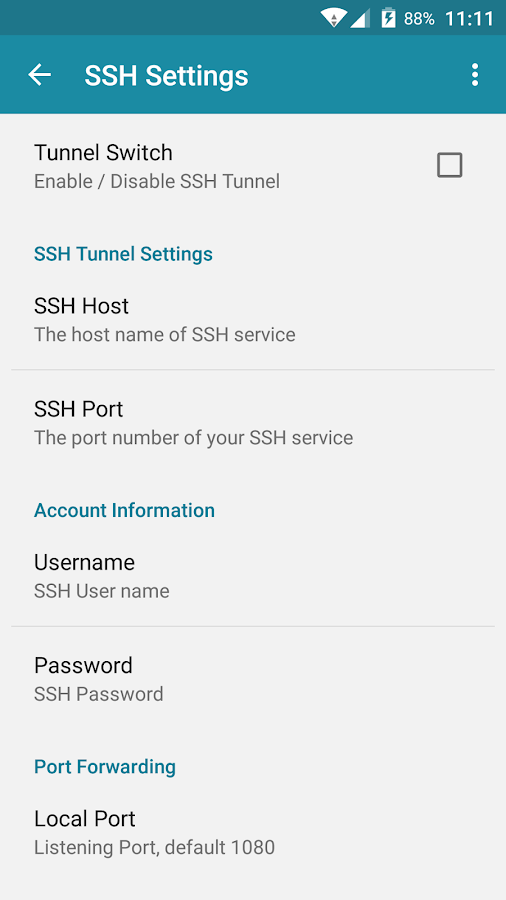
caranya teman-teman buka bagian SSH di HTTP Injector masing-masing:
Lihat gambar lebih jelasnya:
Nah berdasarkan contoh hasil kita membuat akun SSH di atas tadi, maka pengisiannya kolom kosongnya seperti ini:
SSH Host: sgdo1-ssh.mytunneling.com
SSH Port: 443
Username: tunvpn.com-makasih
Password: cijaty

Nah sekarang sudah selesai deh sob!
Tinggal di coba START HTTP Injector teman-teman
Selamat mencoba!

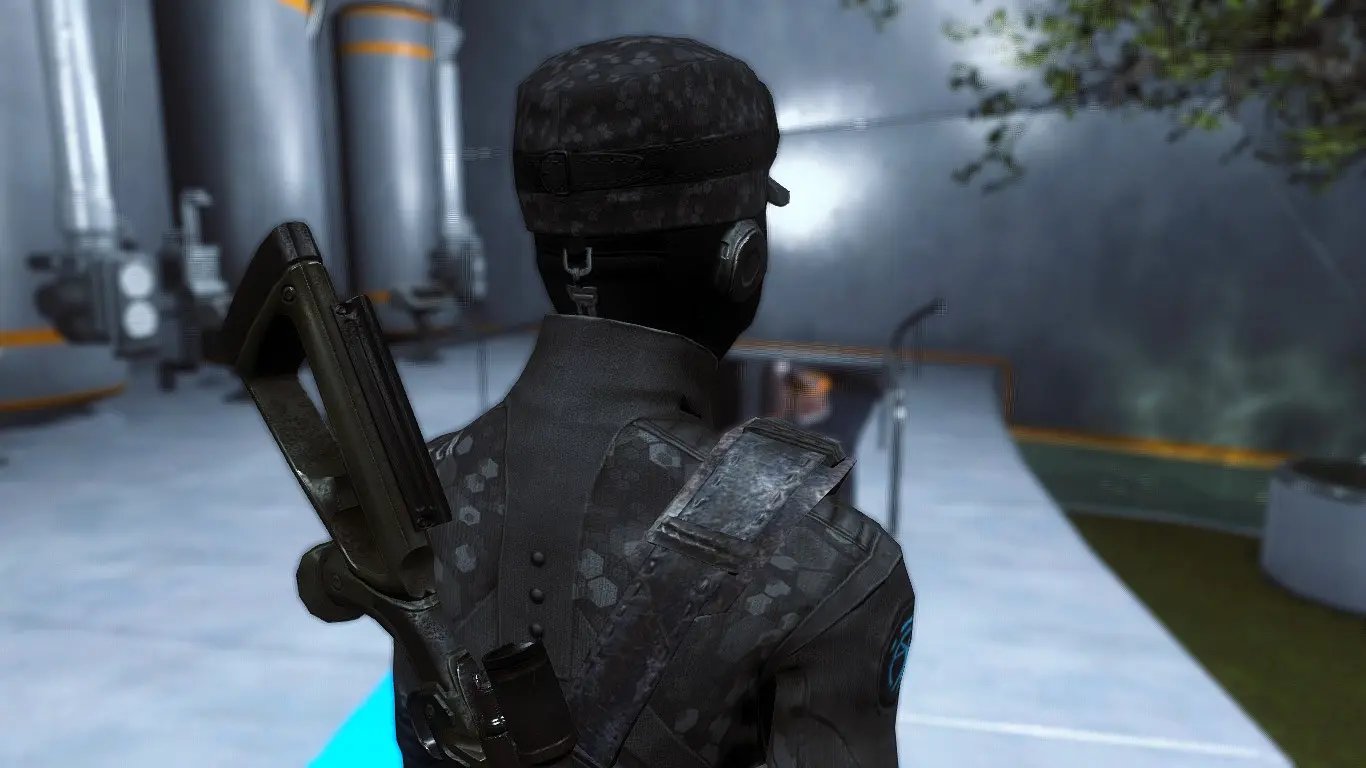
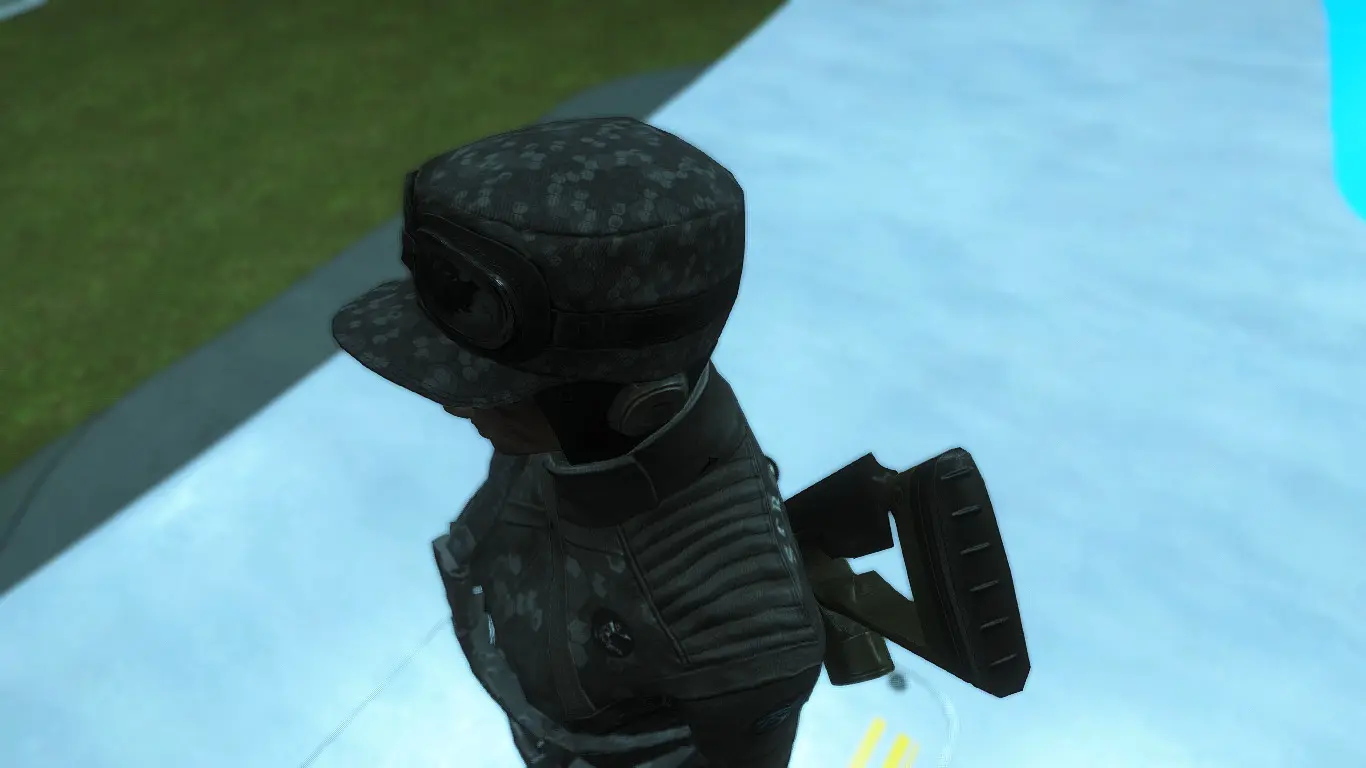
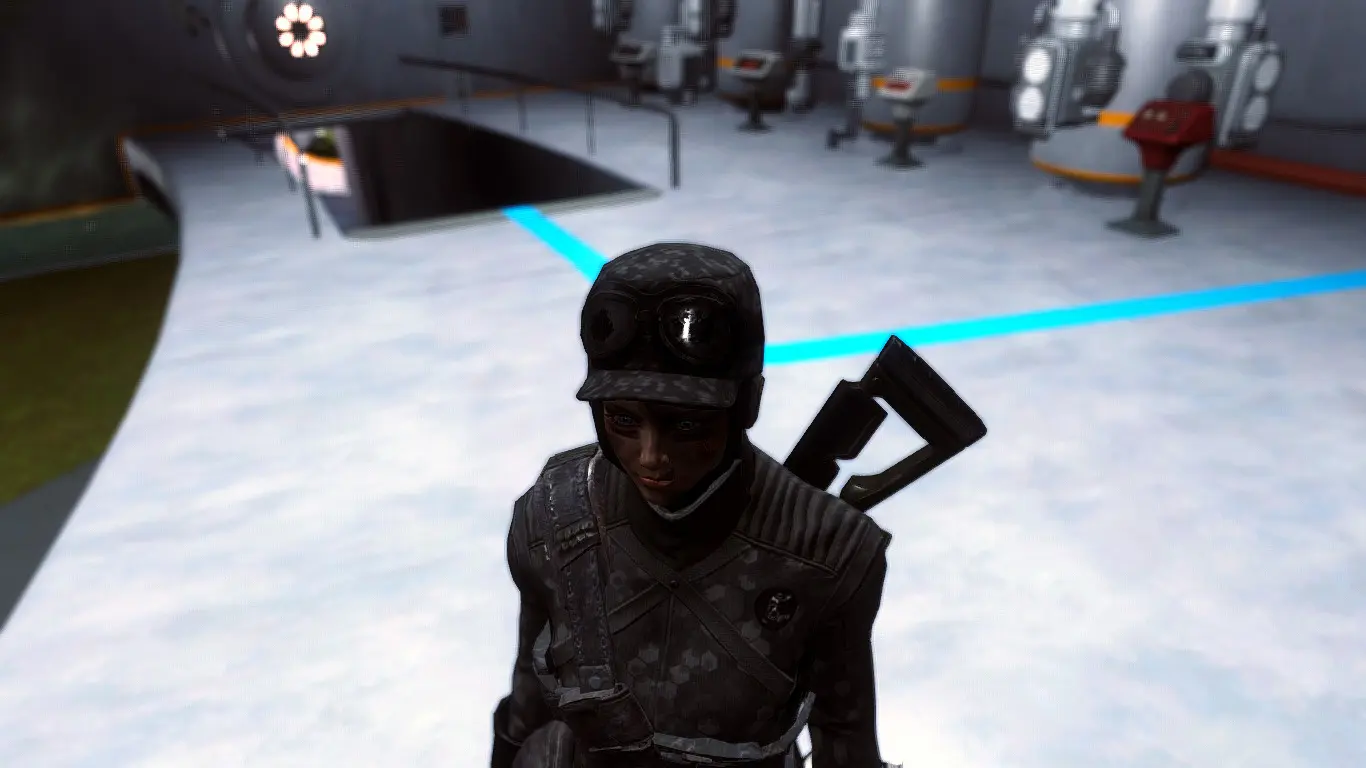
S.C.R - Special Courser Reinforcement Uniform - Hexagon Camo


Camouflaged Hexagon Field Scribe Hat and Synth Uniform

Visit my website for the Latest UPDATE and another mod! :)

If you make a video I would very appreciate if you write a link to my Channel in you're description :)


Description:
Camouflaged Hexagon Field Scribe Hat and Synth Uniform
For now, this is mod is retextured (Texture Replacer) not Standalone MOD

REQUIRED MOD:
Download Armorsmith Extended by Gambit77
optimized the slot usage for all vanilla clothing to use the minimum amount of slots necessary for things to work properly.
Also my Sniper on back was AE mod by Gambit 77


INSTALLATION:
Install Armorsmith Extended by Gambit77 first before installing my mod
Simple using your NMM


MANUAL INSTALLATION:
Just Drag and Drop my mod to your FALLOUT 4 folder


HOW TO GET THE ARMOR?
SIMPLY USING YOUR CONSOLE
type:
help "Synth Uniform" 4
help "Field Scribe" 4


and then you have found the console code e.g 00ffxxxx and type like this:
player.additem 00ffxxxx 1       
*P.S Change " 00ffxxxx " with console code have you found
"1" is amount

  • Author Websites:
  • http://www.watdeheck.net/


    Recommended MOD:
    If u want helmet, armor and weapon texture like my screen you must download
    M.S.R. - More Synth Recolors by RaizuX
*P.S Install M.S.R. first before installing my mod


Tag: Fallout 4 MOD

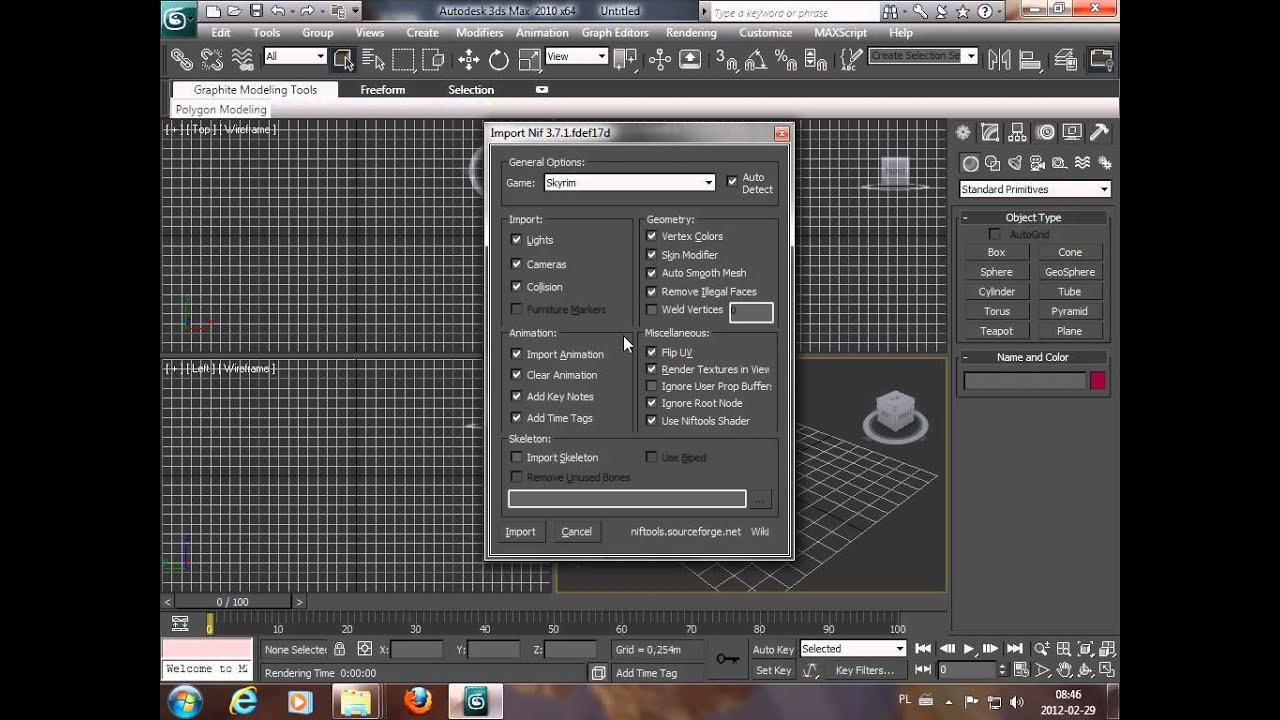
How to Import .Nif to 3ds Max 2012, 2013, 2014, 2015, 2016?

8wfdhabm


This is example pic, Im trying add a new Synth Model.
But I dont know to link Animation to that :\


This is a fork of the niftools.org 3ds max nif importer-exporter. I am only building and releasing as a courtesy to the community and do not plan on maintaining it much as the multi-year gap in releases should indicate.
The plugin currently consists of an exporter, importer and a miscellaneous properties (Collision, Dismemberment, Furniture Markers) for 3ds Max and gmax for read and writing Gamebryo/Netimmerse related files and specifically targeted at Skyrim.
A wiki for the 3ds Max plugins is available at:
http://www.niftools.org/wiki/index.php/3ds_Max

Testing

While all versions have been compiled, only 3ds Max 2012, 2015 and 3ds Max 2016 have received any testing as I do not wish to install all old versions.
If the old versions do not work it would be good to know so they can be removed.

Change Log

  • All
    • Switched to Visual Studio 2015 VC++ Compiler
    • Add preliminary Fallout 4 support
    • Add 3ds Max 2015,2016 support. Support for prior releases no longer maintained.
    • Fixed BSDismemberSkin Modifier on 64-bit versions
    • Move Environment map to Reflection from Specular, Dispacement to Displacement Channel from Reflection on standard shaders
    • Port select changes from blabba and Ehamloptiran
  • Importer
    • Added support for nameless bones (some skeletons lack names and do not import)
    • Added initial import support for CompressedMeshShapeData
    • Added Particle import from Ehamloptiran
    • Fixed Embedded Animation for skyrim
  • Exporter
    • Fix errors on environment map export
    • Change defaults on exporting to reduce number of changes required in nifskope
      • Change Texture Clamp mode defaults
      • Bind SLSF flags to settings in dialog
    • Download from Here

Beginners Guide to Installing Fallout 4 Mods

Just because Bethesda hasn't released their G.E.C.K. modding kit yet doesn't mean we can't start modding! Here's how to get started.
by   
Until Bethesda releases their mod kit, modding Fallout 4 can be a frustrating mess of following instructions and reading walls of text. Fear not, we're here to teach you how to install some of the most popular mods out right now.
Before we get started, though, we'll have to change a few files to get mods working with the game, let's go over that below.

IMPORTANT: To have these mods work you must make some changes to a few .ini files.
  • First, Navigate to your "Documents\My Games\Fallout4" folder.
  • Next open the Fallout4Prefs.ini file.
  • Find the section marked [Launcher] and add the following line: bEnableFileSelection=1

Your Fallout4Prefs.ini file should like it does above when done. Save and close.
  • Next open the Fallout4.ini file.
  • Find the section marked [Archive]
  • Find the line "sResourceDataDirsFinal=STRINGS\"
  • Change it to "sResourceDataDirsFinal=STRINGS\, TEXTURES\, MUSIC\, SOUND\, INTERFACE\, MESHES\, PROGRAMS\, MATERIALS\, LODSETTINGS\, VIS\, MISC\, SCRIPTS\, SHADERSFX\"
When that's done, save and close. Now you're ready to begin modding Fallout 4!
                                                                                                                         
First things first. You're going to need this Fallout 4 mod manager. It's in its early stages, but as I mentioned before, until Bethesda releases their mod kit, this is whats going to make things easier for us.
This mod manager will not work for installing every mod. In this guide we will cover how to install mods with the mod manager, and how to install mods without the mod manager. But first we'll go over how to use the mod manager.

Setting up the Fallout 4 mod manager (if your NexusModManager not work use this F4 MOD MANAGER)

The first thing we'll have to do, is head on over to the Nexus and download the mod manager. The download link will look like this: 
After you've downloaded the mod manager, extract the contents and place the Fallout 4 Mod Manager folder into your Fallout 4 directory.

When you open the Fallout mod manager you will be greeted with this screen:
When you want to install a mod, click on the install button, highlighted here with a red rectangle. After you click the install button, it will ask you to find the downloaded mod file.
For this demonstration, I will install the mod More Armor Slots (mod info below).
After you have found the download file, a window like this will pop up. If it says "Looking Good!" at the bottom, you're all clear for a good install.

Click that install button one last time, and there you go, mod installed!
Don't forget to make sure the boxes on the left side are checked. If you leave them unchecked, they won't activate when you launch the game!

About me

Let me introduce myself


A bit about RWH

Feel your life is useless? without a purpose in life? Stop, dont!

You know a families movie titled "Hugo", I guarantee you certainly ever watched and most have never heard of the film's title if you dont know I recommend to watching. Because there are a great quote that says, roughly like this: "I had imagined the whole world this is the 'Giant Machine'. You certainly know, there is no machine that has excess parts. Machines are always made with the right parts as needed. Therefore I think that the world is 'Giant Machine'. And I would not be as 'parts' of excess. I'm here for sure for a reason. And that means you also are in this world for a reason. "- Hugo. If I am the parts in a 'Giant Machine', certainly my existence has meaningful, right? Yes, no matter how small it is, Its meaningful to the world! Me and all of you! we were not in this world for our own benefit only. We have important tasks for the survival of the world. Is not this awareness makes us want to contribute more to the world? THINK ABOUT THAT!

Wahyu Hidayat

Wahyu Hidayat

HIKER

TRAVELER

ENGINEER

MOUNTAINEER

GAME MOD DEVELOPER

Let's Connect

Contact

Remember that becomes IMPORTANT is good, but BEING GOOD is more important than just being an important person.

Birthday: 28 FEB 1994
Phone number: +(62) 821 386 59 616
Website: www.watdeheck.net
E-mail: revelationwh@gmail.com
Life is like tracking a mountain peak, peak is the exact destination of a journey. If you cant reach the peak, it will be considered as a debt that must be repaid at some point of time. And Goal will also apply in our everyday life, there are peaks of life that we must reach out.

RESUME

Know more about my past


Career

  • 2012-future

    Freelance Traveler @ PALAREJO

    Ut enim ad minim veniam, quis nostrud exercitation ullamco laboris nisi ut aliquip ex ea commodo consequat. Duis aute irure dolor in reprehenderit in voluptate velit esse cillum dolore eu fugiat nulla pariatur. Excepteur sint occaecat cupidatat non proident, sunt in culpa qui officia deserunt mollit anim id est laborum.

  • 2012-future

    Mod Developer @ GTA5-mods.com | Nexusmods.com

    Ut enim ad minim veniam, quis nostrud exercitation ullamco laboris nisi ut aliquip ex ea commodo consequat. Duis aute irure dolor in reprehenderit in voluptate velit esse cillum dolore eu fugiat nulla pariatur. Excepteur sint occaecat cupidatat non proident, sunt in culpa qui officia deserunt mollit anim id est laborum.

  • 2012-future

    Owner @ LeatherSmithery.com - LEA SMITH

    Ut enim ad minim veniam, quis nostrud exercitation ullamco laboris nisi ut aliquip ex ea commodo consequat. Duis aute irure dolor in reprehenderit in voluptate velit esse cillum dolore eu fugiat nulla pariatur. Excepteur sint occaecat cupidatat non proident, sunt in culpa qui officia deserunt mollit anim id est laborum.

Education

  • 2015-2016

    Islamic University of Indonesia Try to reach Goal

    Ut enim ad minim veniam, quis nostrud exercitation ullamco laboris nisi ut aliquip ex ea commodo consequat. Duis aute irure dolor in reprehenderit in voluptate velit esse cillum dolore eu fugiat nulla pariatur. Excepteur sint occaecat cupidatat non proident, sunt in culpa qui officia deserunt mollit anim id est laborum.

  • 2013-2014

    Faculty of Industrial Technology Still Fighting

    Ut enim ad minim veniam, quis nostrud exercitation ullamco laboris nisi ut aliquip ex ea commodo consequat. Duis aute irure dolor in reprehenderit in voluptate velit esse cillum dolore eu fugiat nulla pariatur. Excepteur sint occaecat cupidatat non proident, sunt in culpa qui officia deserunt mollit anim id est laborum.

  • 2011-2012

    College of Chemical Engineering The Beginning

    Ut enim ad minim veniam, quis nostrud exercitation ullamco laboris nisi ut aliquip ex ea commodo consequat. Duis aute irure dolor in reprehenderit in voluptate velit esse cillum dolore eu fugiat nulla pariatur. Excepteur sint occaecat cupidatat non proident, sunt in culpa qui officia deserunt mollit anim id est laborum.

Skills & Things about me

Photography Enthusiast
Mod Developer
Traveler
Graphic Designer
Gamer
CSS HTML

Services

What can I do


Ideas

Lorem ipsum dolor sit amet, consectetur adipisicing elit, sed do eiusmod tempor incididunt ut labore et dolore magna aliqua.

Web Design

Quis nostrud exercitation ullamco laboris nisi ut aliquip ex ea commodo consequat. Donec sit amet venenatis ligula. Aenean sed augue scelerisque.

Graphic Design

Duis aute irure dolor in reprehenderit in voluptate velit esse cillum dolore eu fugiat nulla pariatur. Excepteur sint occaecat cupidatat non proident.

Games Mod Development

Duis aute irure dolor in reprehenderit in voluptate velit esse cillum dolore eu fugiat nulla pariatur. Excepteur sint occaecat cupidatat non proident.

Photography

Lorem ipsum dolor sit amet, consectetur adipisicing elit, sed do eiusmod. Donec sit amet venenatis ligula. Aenean sed augue scelerisque, dapibus risus sit amet.

User Experience

Quis nostrud exercitation ullamco laboris nisi ut aliquip ex ea commodo consequat. Donec sit amet venenatis ligula. Aenean sed augue scelerisque, dapibus risus sit amet.

Contact

Get in touch with me


Address / Street

KH. Muhdi Street Depok Sub District, Sleman. Yogyakarta. Indonesia

Phone number

+(62) 821 386 59 616

Website

www.watdeheck.net